Principled Building: How We Approach AI at Help Scout


If you’ve been following Help Scout for a while, you know that we weren’t the first to jump on the AI bandwagon. There are many reasons for that, but the main one is that the tech just wasn’t ready. We’re in the unique position of not only being the developers of our platform but also the test users. If something isn’t good enough for us, it’s not good enough for our customers, either.
Instead of chasing flashy demos, we’ve tried to be intentional about where AI belongs in our product and where humans should stay firmly in the lead. These days, you’ll find several AI-enhanced features in Help Scout, but we’ve kept our building rooted in customer centricity over feature parity.
We know our approach looks different, which recently led lead product manager Ryan Brown and principal designer Buzz Usborne to formally outline a set of principles surrounding the way we build AI. The principles help keep our building focused on features that provide quality service to customers, give teams more time to focus on high impact tasks, and leave humans in full control of the experience.
In this post we’ll share a bit more about our principles, the thinking behind them, and what they look like in practice by examining how they show up in one of our core features, AI Answers. If you’ve been hesitant to introduce AI into your support flows, we get it — we were too! We hope this peek behind the scenes will give you a little more confidence in what you can expect from AI at Help Scout.
Help Scout’s AI product principles
Help Scout’s approach to AI design and development is broken down into five principles that our product, design, and engineering teams use to decide when something should be AI-powered and how it should show up in the experience.
We wrote these principles so every team at Help Scout has the same gut check: Is this using AI where it’s strong, and does it still feel like something our customers can understand, review, and trust?


Ryan Brown
Lead Product Manager
Together, these principles keep us from treating AI as a bolt-on feature or a mystery box, and they instead push us toward experiences customers can review, trust, and improve upon.
1. Use AI where computers excel
Humans and computers are good at different things. Great support is driven by traits that are deeply human like empathy, nuance, and good judgement. While AI isn’t as good at these elements of support, it excels at pattern recognition, processing large amounts of data, and surfacing insights.
When we set out to build an AI feature at Help Scout, we consider the technology’s strengths and weaknesses and look for ways that AI can be used to complement the work humans do. We never build to remove their control, but we instead aim for our AI to be a partner.
Simply put, we want to help lighten the load for support pros where we can and stay out of the way in places where we can’t.
2. Skip the blank page
Most writers will tell you that one of the most intimidating things about their craft is the blank page. The same can be true for those working in support. Sometimes you know what the answer to a customer’s problem is, but you can’t think of how to explain it in a reply; you might have an idea for a way to automate a task, but you aren’t sure of where to start.
We want all of our AI features to give you something to react to. This might be an AI-generated draft or an initial report or workflow to help get the process rolling. We also want to ensure that these starting points are meaningful, which is why we use the knowledge you already have — your Docs site, conversation history, and voice and tone guidance — to inform the AI’s output.
Just like the first draft of a blog post, these initial outputs from an AI tool provide teams with momentum and can remove unnecessary friction.
3. AI should never be the only way to complete a task
Just because AI can save you a lot of time, it doesn't mean it’ll be the best choice in every circumstance. We know that there will be times when our customers will need (or even just want) to handle a task manually.
Because of that, a hard and fast rule for us is that AI is never the only way to get something done in Help Scout. You can always see what it did, roll it back, or route a customer straight to a human if that’s what the situation calls for. We don’t think that human oversight is a fallback; instead, we believe it’s something that our customers want, and we build to support that.
Recommended Reading


4. AI should behave like a co-worker
There’s no shortage of people willing to tell you that support teams are on the verge of being replaced by AI. But anyone who has ever had to contact support knows that this simply isn’t true. Chatbots are notorious for putting people into doom loops, and AI copilots and assistants can make mistakes too.
The best AI support tools don’t replace humans — they clear the runway for them. If the computer can resolve a routine question safely, your team gets to spend more time on the moments that actually need empathy and judgment.
We want AI to feel less like a mysterious magic trick and more like a new team member: You can see what informed its answer, give it feedback when it gets something wrong, and watch it get better over time.
5. AI isn’t a bolt-on feature
When product teams scope out a new feature, the path is usually straightforward: Talk to customers, figure out what’s feasible (usually outlining where it will fit into an existing area of the product), and map out what you’re going to build. AI is different. Often when you work with AI, you set out to create one thing, and you find something even better during the process.
Ryan explained, “We don’t bolt AI onto the side of existing features just to tick a box. We use it early in the design process to explore options, then ship the things that actually make support faster, clearer, or more delightful for customers.”
Essentially, we don’t believe in deciding what to build ahead of time. We start off broadly, experimenting with loose prompts. Then, we refine as we learn, narrowing in on what will make the most impact.
Recommended Reading


Built on principle: Exploring AI Answers
When Ryan and Buzz shared these principles, it was obvious they weren't new ideas; rather, they’re a way to codify how the team already worked. Take AI Answers, our chatbot feature, for instance. We started building AI Answers more than two years ago, and you can see these principles in both the original concept and in the improvements we’ve made based on feedback from both customers and our own support team.
“AI Answers is our best example of these principles in the wild,” Ryan noted. “It’s powered by a team’s own knowledge, tuned by their feedback, and always gives their customers a way to talk to a human when they need one.”
Let’s take a closer look at how the principles show up throughout the AI Answers experience.
Instant help, never a dead end

![Beacon w/AI Answers [in-line blog image]](https://hs-marketing-contentful.imgix.net/https%3A%2F%2Fimages.ctfassets.net%2Fp15sglj92v6o%2F6bMVB10h9vl9FNFyZjKgur%2F89f4d46a9271fda1946b2eed323aaa7e%2Fimage1.png?ixlib=gatsbySourceUrl-2.1.3&auto=format%2C%20compress&q=75&w=873&h=582&s=468926b8c2b414c39871cf1b2bbb50f2)
Customers don’t want to wait for help, which is why a chatbot is such a popular self-service feature. But speed isn’t very impressive when the answers given are off base. Most people understand that AI may not be able to answer every question, and frankly, they may not even want it to. As long as the option to bypass the tech for a human is available, customers are usually pretty forgiving.
We get that, and we’ve built AI Answers in a way that allows humans to offer and receive support in the way they prefer. Your team decides which support channels to offer — chatbot, knowledge base, email, or live chat — and your customers get to decide which of those work best for them. AI should never be the only way to give or receive support, and in Help Scout, it isn’t.
This approach has worked well for our customers. Luke Tristani is the director of onboarding and success at eCatholic, a SaaS platform that helps churches, schools, and ministries share their mission online. He recently shared with us how he feels about using AI Answers as part of eCatholic’s self-service strategy:
We’ll always keep human support at the heart of what we do. Help Scout helps us strike that balance — empowering customers to find answers on their own, while making sure our team is right there when they need us.
Built on your knowledge, in your voice

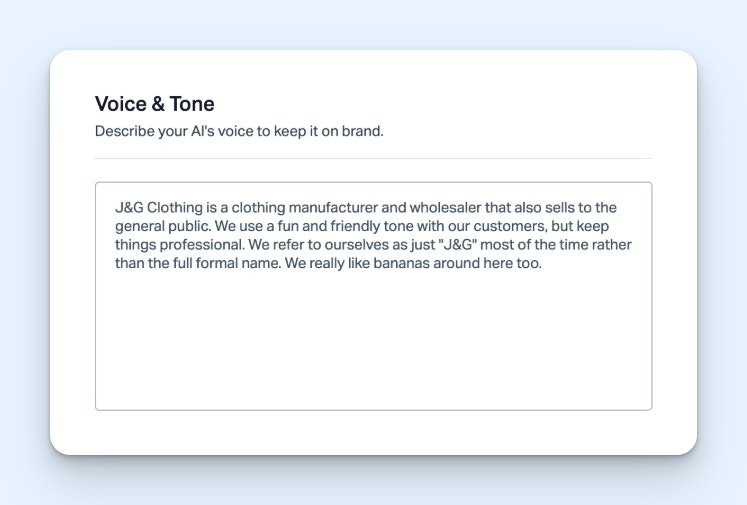
Some support leaders have told us that they are hesitant to introduce AI because they don’t want to provide a watered-down experience. They’re dedicated to human support, and they believe that a chatbot is going to provide cold, impersonal, and imprecise help. It’s easy to understand where this opinion comes from, as it was very common with the rule-based chatbots that previously dominated the space.
If a question was outside of a bot’s programmed chat flow, it couldn’t help. Its response was also delivered in a robotic way that felt far from human. Even when powered by generative AI, the same thing can happen. If the LLM is just trained on the internet at large, it may not be up to date, or, if its answers are factually right, they may be delivered in a way so off-brand that it still feels wrong.
We want AI Answers to feel truly helpful, seamless, and human at its core, even though it's an AI product.


Scott Rocher
VP of Product
The idea of training AI can be really overwhelming, which is why, with AI Answers, we make sure that you can “skip the blank page” by having your help center content be the main knowledge source for your chatbot. Because its responses are based on your existing content (alongside any additional sources you provide, like your company’s homepage) it will deliver help that sounds like you right out of the box. This gives you a strong base to build on.
Coachable by your team


While it’s true that many support teams are worried about losing the human touch, that doesn’t necessarily mean that they aren’t interested in implementing AI at all. Many are open to letting AI take over some of the easier customer questions or routine maintenance tasks in their help desks as long as the use of AI doesn’t require the sacrifice of quality.
AI Answers is coachable by design. Through our improvements feature, when the AI misses the mark, you can easily enter what would have been a better answer into the system. This ensures that the next time a customer raises the issue, the response is accurate and on-brand.
AI Answers can also automatically suggest improvements to a given response based on how your team has handled similar questions in the past. Then you can review the suggestion and decide whether or not to apply the improvement. The process is lightweight, fast, and doesn’t require you to write (or rewrite) an entire support article to make it happen.
Just like a new employee, AI Answers may not get everything right in the beginning. But also like a new employee, you can give it feedback and it will get better over time.
Recommended Reading

Transparent and responsible


Generative AI bases its responses on patterns it has observed in its source materials. This is great for creative projects or for generating conversations that actually feel “real.” The trouble is, AI doesn’t always know the answer to your customer’s questions and still may reply confidently. This can be especially problematic in situations where it’s not clear that a response is AI generated. While people understand AI may not always be right, their expectations for humans are higher.
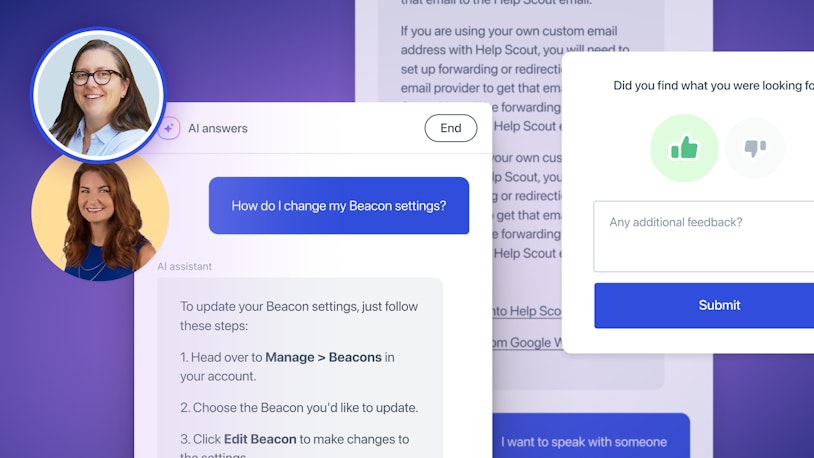
AI Answers is designed in a way to ensure that customers always know they are interacting with a computer. The chatbot also provides the sources it used for every answer, allowing customers to follow up and team members to see where improvements can be made.
In addition, AI Answers doesn’t provide an answer if it’s unsure. Before a response is delivered, a final fact-checking prompt is run. This is separate from how the original answer was generated, and it’s used to verify the response against the system’s available sources.
If the AI determines that the answer is correct, it delivers it to the customer; if the response is wrong, it doesn’t. In the latter case, AI Answers will let the customer know that it doesn’t know the answer and offer to escalate the issue to a human.
Integrating transparency into our tools is one of the key ways we hope to build trust with our users. We know how important it is for AI Answers to deliver accurate information to your audience, and we take that responsibility seriously.
Optimize for customer outcomes

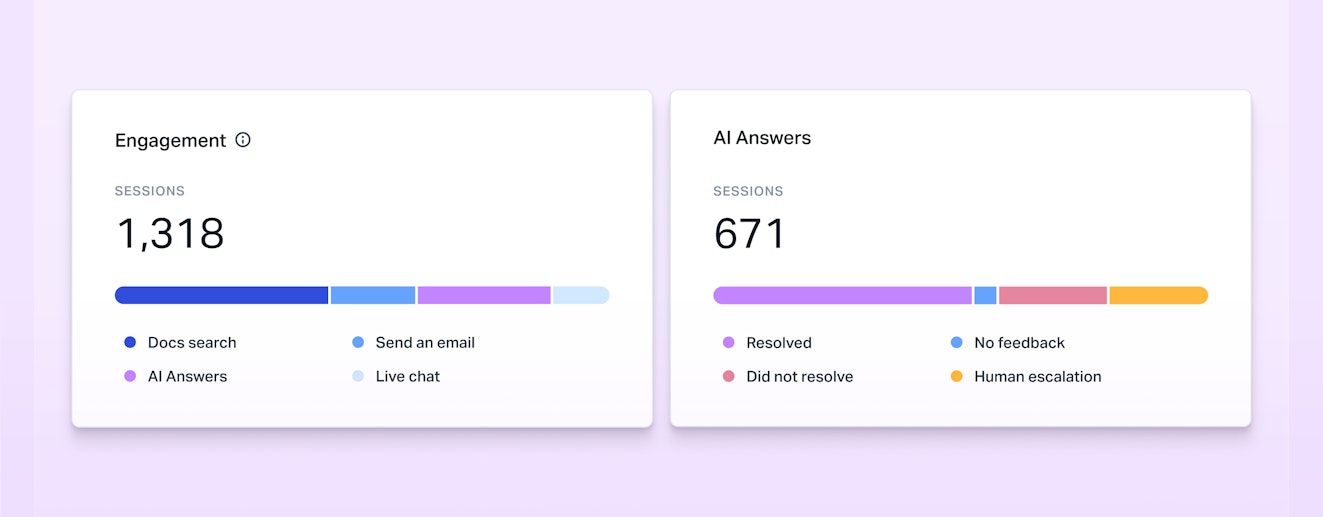
Some software measures AI’s success on how many emails it can deflect from your inbox. But just because a customer didn’t reach your team, it doesn’t mean they got what they needed. As a customer-first company, this metric has never sat well with us.
We report on AI Answers’ resolutions (conversations that were resolved by AI without any human assistance) and escalations (conversations that required human intervention). We’re also in the process of adding in a CSAT survey so customers can weigh in. With that data in hand, your team can then do what people do best — review results, spot issues, follow up with customers who need more help, and make improvements to the AI as necessary.
While AI can’t resolve every issue your customers face, it can partner with you to ease the load. Then, with this data in hand, your team can focus on defining what “good support” looks like for your business and mapping out the best way to get there.
Part of a cohesive ecosystem
The SaaS software space is crowded, and it can be hard to avoid chasing after what your competitors are doing just to check a box on a pricing page. Obviously, being aware of what’s out there is important. However, when everything is tit for tat, you risk building features that are just tacked on to your experience vs. being fully integrated.
As we look to the future, we’re evolving our AI into something that isn’t just off to the side; rather, it’s something that can be woven into how support happens across channels. AI Answers is just the first step. Over time, you’ll see Help Scout give you more ways to let AI handle the busywork while keeping you and your team firmly in control of the customer experience.
Recommended Reading
Building responsibly
We’re just at the beginning of where AI will likely take the support industry, but that doesn’t mean that the humans behind every customer service operation are going anywhere. AI is good at probability and at synthesizing large amounts of data, but it fails when faced with nuance, judgement calls, and the unknown — all of which are required for good support.
The sweet spot for AI will be in integrated features that keep the customer experience front and center, providing the right mix of automation and human oversight. We think we’re on the right track, but you don’t have to take our word for it.
Give AI Answers a try, either in your own account or here on our site, and see how it stacks up.
Alexa Ahrens
Alexa is a content strategist at Help Scout, where she writes and helps other authors tell stories about customer experience, technology, and company culture. Before working in support and content creation, she worked at a wax museum — an experience that prepared her surprisingly well for a life of storytelling. Connect with her on LinkedIn.