AI Adoption at Work: It’s a Process


Last summer I wrote a post about my efforts to keep an open mind when it came to AI, while still holding a place for my skepticism. And you guys, the last eight months have felt like a lifetime.
I’m convinced that for all of us in tech (and those who generally work in knowledge-driven or creative fields), AI has played a big role in that. And, depending on who you are and what shapes your worldview, you’re likely feeling either excited or exhausted.
While we could dive into both perspectives, this post isn't about whether AI is good or bad. I want to do something that (I think) will be more valuable to you than another pro/con analysis.
In this post I’m going to talk about what AI adoption at work has looked like for me. And in case you've also been struggling with the transition, we'll also go over some of the ways our team is using AI that are useful, but still preserve agency.
The 5 stages of grief…er…AI adoption
Over the past few years I’ve watched myself (and those around me) go through distinct phases when it comes to introducing AI into daily workflows. I’ve been trying to think of how exactly to explain them to you in this post, and I must admit, all that has come to mind is the “five stages of grief” graph:

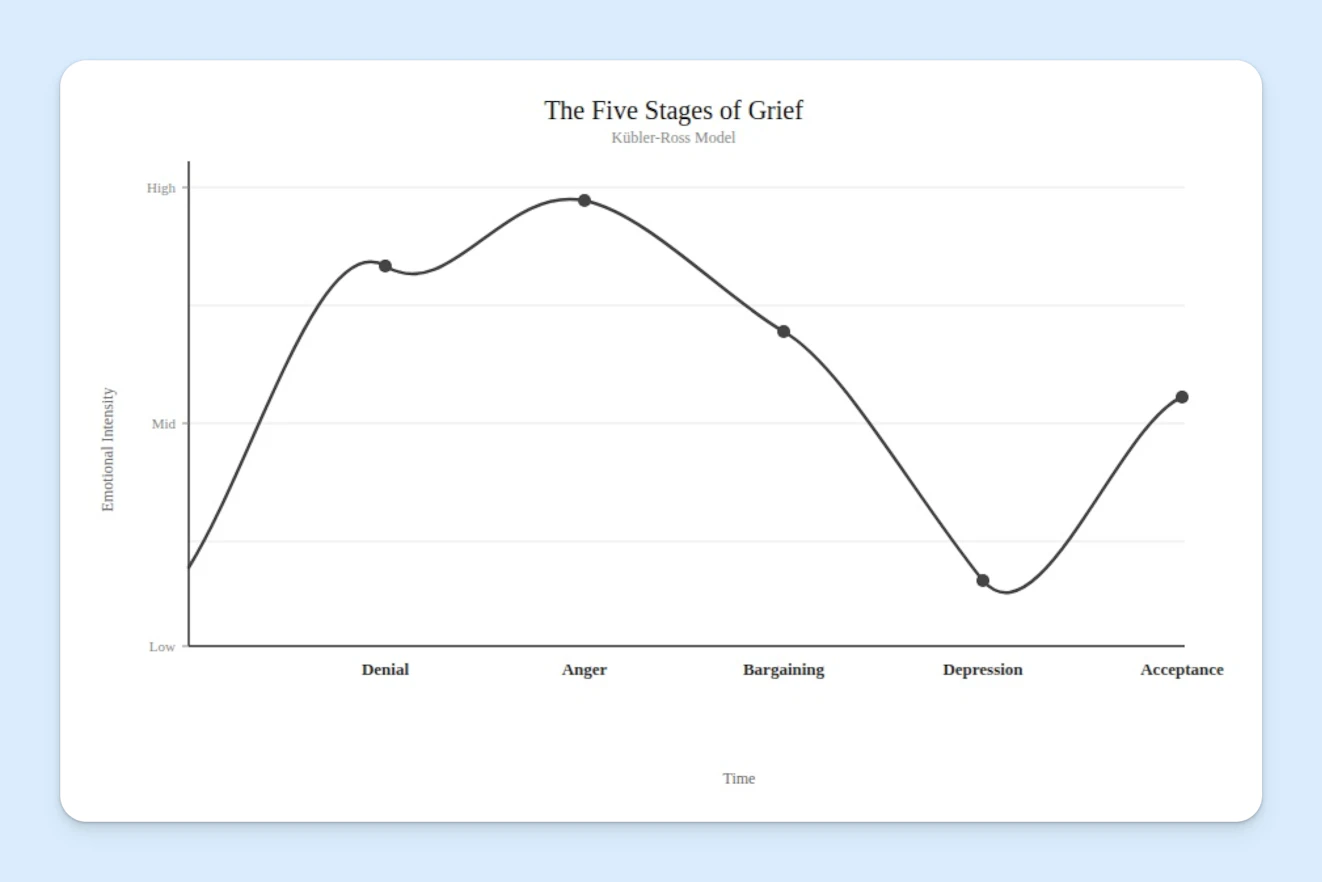
I know, I know. Dramatic. But I don’t mean it that way. I do think people are going through the actual stages of grief when it comes to AI, as the changes happening in the workforce are real (and in some cases, life altering). However, in this case, I’m really just describing what it’s felt like to learn how to use AI at work. It’s kind of been like this:

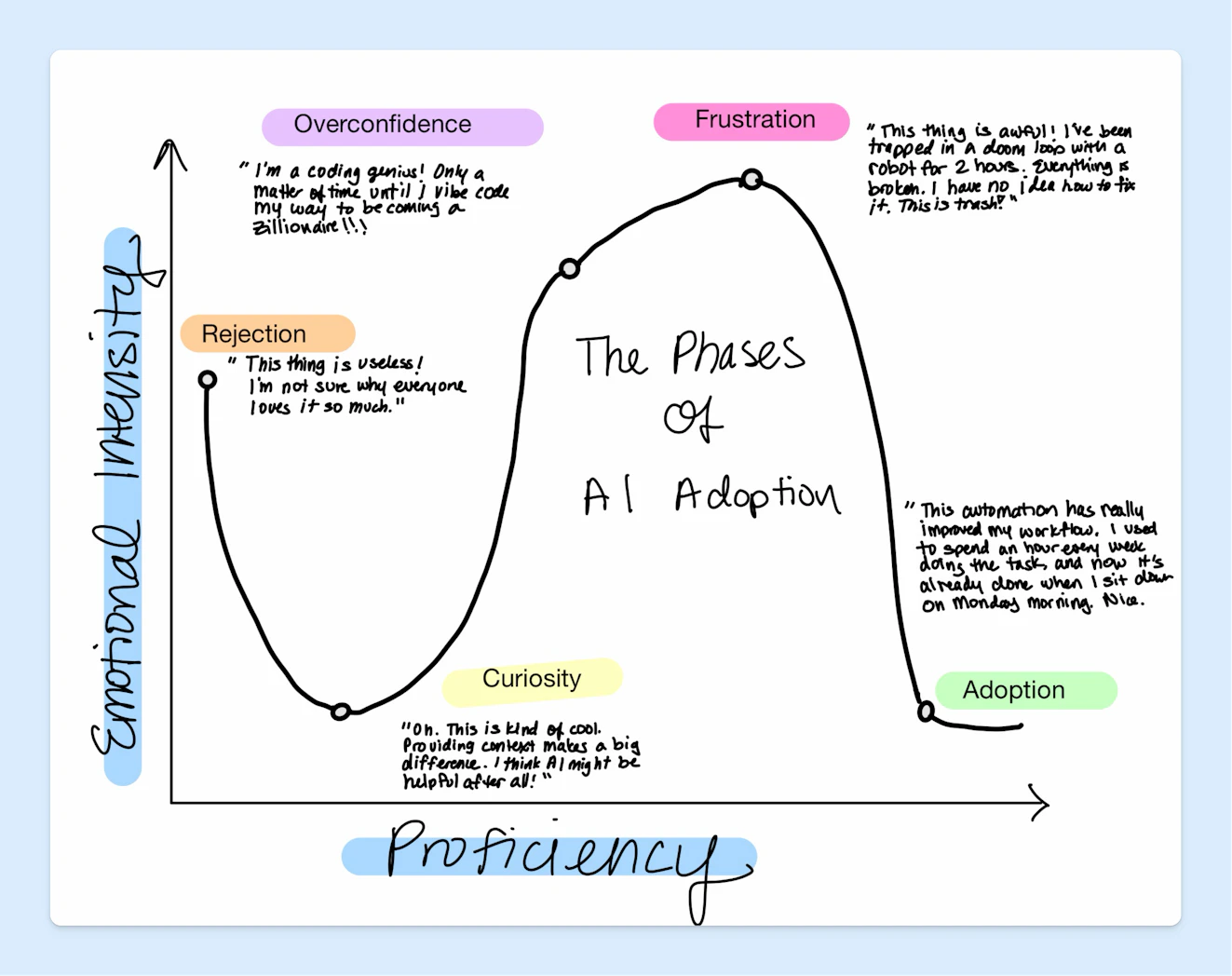
In case you can’t read my handwriting, which, given my penmanship grades throughout elementary school, is a likely scenario, let me define the phases here as well:
Rejection: You ask ChatGPT a question, in natural language, with no context, and are disappointed that the results are generic and, well, bad.
Curiosity: Someone in your orbit points out a way that AI might actually be useful. You learn a bit about prompting, examples, and supporting documentation. You begin to see the value.
Overconfidence: You deem yourself an AI wizard who can do anything. You blow through tokens like there is no tomorrow, creating lots of cool things…that no one is ever going to use.
Frustration: The realization that while you can build a prototype of anything, actually making it good does take at least some baseline skills in that domain.
Adoption: You pivot to developing simple (yet powerful) automations or builds — in your own domain — that actually make your job easier. And when you do make something in an area that you don’t have a lot of experience in, you recognize when it’s time to tap in an expert.
The reason that these remind me of the stages of grief is that it’s common to fall back into previous phases or skip ahead to ones further along the path. Let me show you what I mean.
My trip through the phases
When ChatGPT launched, I rejected it out of the gate. While its answers were more impressive than I expected, the quality was still pretty poor, so I kept my distance.
Then last year, I got curious after watching a Content Marketing World session on the topic of AI. I built a couple of custom GPTs and began to see how the tech might be useful in my work. Following that success, I built a few apps, which honestly was pretty rad. I got that same thrill that used to come with laying down some sick HTML and CSS-driven customizations to my MySpace page.
(Fellow Millennials, I see you!)
While I was legitimately impressed with what I built, the joy faded as I realized that the apps were slow, and filled with bad code. My development chops weren’t good enough to know how to help the agent fix my work. It was frustrating, and literally no one (including me) used what I built.
Finally, we get to the present day, where I’m leaning more into simple, smart ways to incorporate automation and AI assistance into my workflows. I might not become a “zillionaire” anytime soon, but I’ll live.
Better make that trips...
Based on the above, you might think I’ve reached the end of the process. However, much like with grief, AI adoption is not linear. Sometimes I sink back into frustration because I can’t make an app work or I feel like the push from others to incorporate AI into a task is unreasonable.
I sometimes even swing all of the way back into the rejection stage, deciding that the only way forward is to retreat to a remote cave.
(We haven’t automated the caves yet, have we? I’ll ask an agent and report back…)
Of course, it’s not all bad. I don’t want to give that impression, because I slip into the fun phases too. I drift into overconfidence, excited when my teammates and I can not only imagine a solution to a problem, but also bring it to life. I get pumped every time I automate a task that I find boring or cumbersome.
Basically, it’s a roller coaster. And I wanted to talk about that, because while our graphs might not look exactly the same, I know a lot of you are feeling this too.
Right-sized examples of AI adoption
Okay. We’ve established that the entire subject of AI is both interesting and maddening. Exciting and frustrating. Fine and…less fine. So what do we do about that?
I can’t answer that question for you. Much like grief, the process is something you have to go through at your own speed.
But, what I can show you are a few of those AI use cases that are starting to feel more natural to me. Because as turbulent as this can all feel, there really are ways to incorporate AI that are genuinely helpful, don’t impact quality, and still let you steer the ship.
Let’s look at a few.
Writing and editing assistants

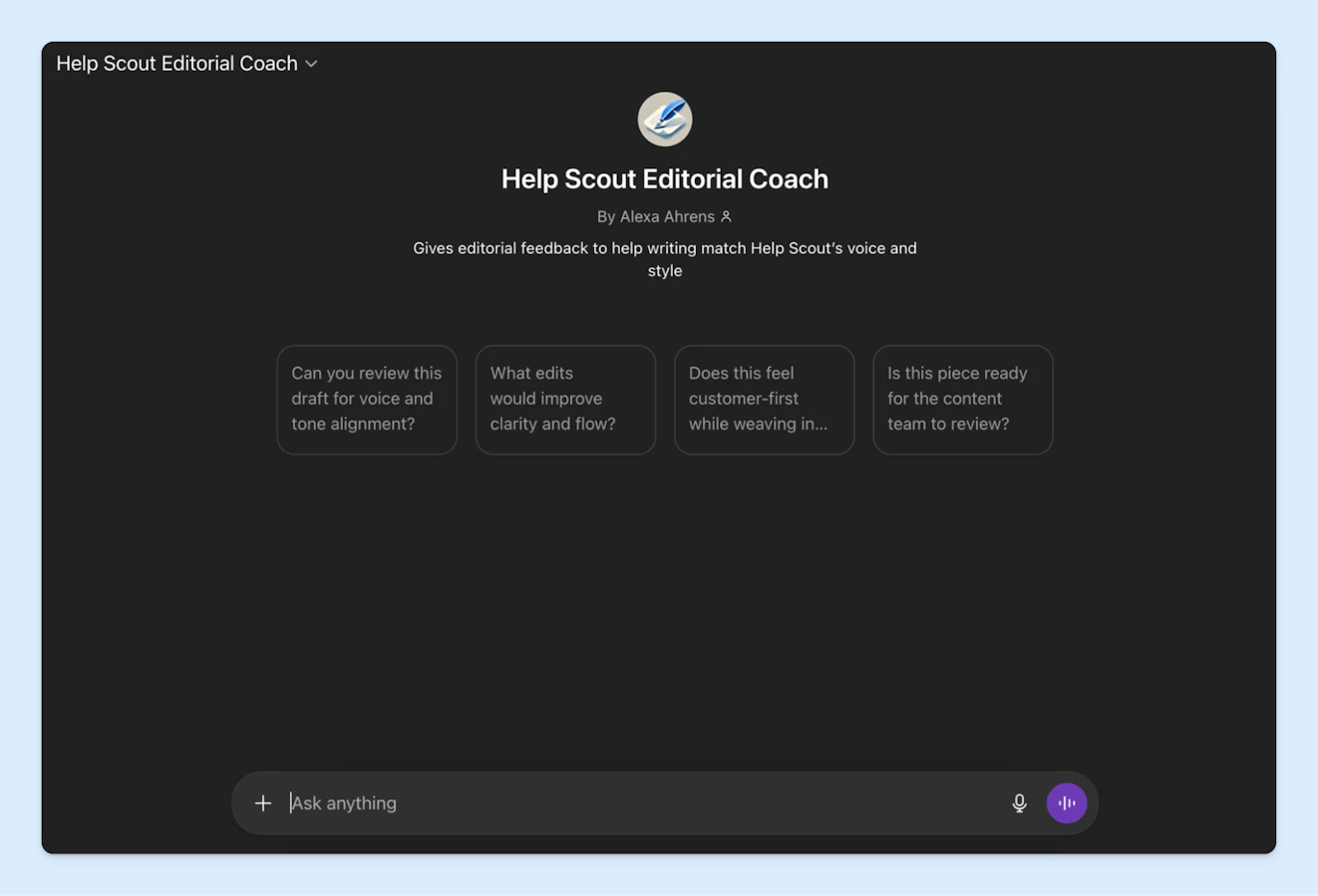
The marketing team has several custom GPTs/Claude skills in use to help with writing and editing copy:
Editorial coach: This was my original GPT and it helps non-writers get drafts to a better place before passing them to the content team for review.
Content team assistant: I use this one to help with editing and to give me something to react to when I feel stuck.
UX writing assistant: Will, our copywriter, created a skill that is similar to the editorial coach, but specifically focuses on non-editorial content like landing page and email copy.
Social media writing assistant: A few folks at the company have skills that help them brainstorm ideas for what to post on their social accounts. They still write the posts themselves, but having a tool that gets rid of the blank page has been helpful.
We believe in keeping writing at Help Scout human, but having these assistants available does help with turnaround time and capacity.
Content discovery

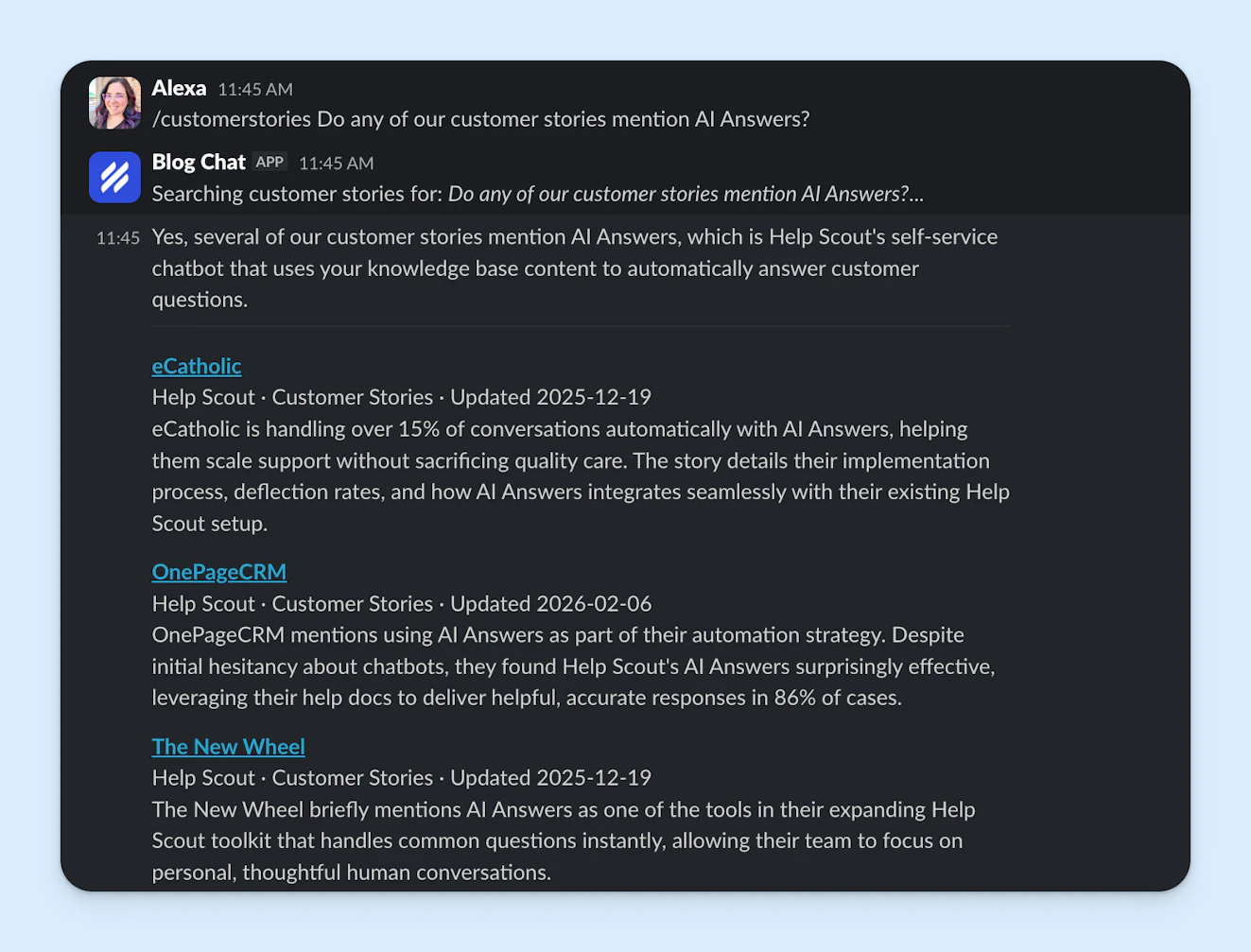
Help Scout is known for our content, and we have a lot of it. It can sometimes be hard to find what you’re looking for, so I created a Slack app to help folks search through the library. You can ask for a certain type of content in natural language and the results include titles, dates, authors, a quick summary, and a link out to the published piece.
We’re also thinking about ways that we can make it easier for customers to find the right content. While it’s too soon for me to share what solution we’ll land on, our early experimentation has convinced me that there are lots of ways that AI will be able to help.
Art generator

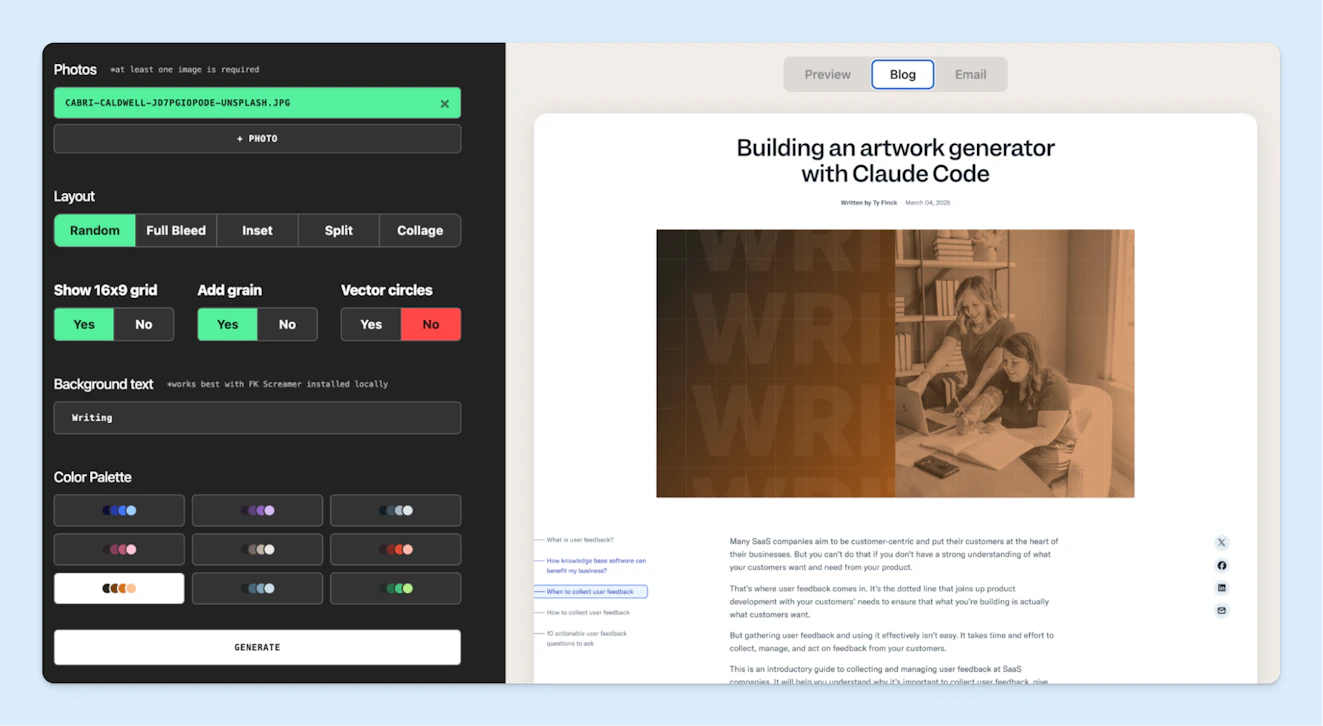
We have a lean (but mighty) design team and while blog art is important, it’s not always something that they can get to immediately. Our principal brand designer, Ty, built an art generator that can create featured images that align with our brand guidelines.
Now, the tool is a little different from what probably comes to mind when you think of an AI-generated image. Rather than drawing from its training, the AI is simply taking an image we provide and applying some of the same design techniques our team uses.
It can often take a few tries to get something that feels right. However, it gives you an SVG file, so it’s easy to pass it over to design to take it the rest of the way if needed.
While some posts will always warrant something bespoke, having a tool that anyone can use is helping us become more agile.
Transcription


Mat, host of Help Scout’s Supportive podcast, says that having transcripts for each episode makes the content easier to refer back to. It also helps when he wants to reuse elements from the interviews in other contexts.
While the AI transcripts aren’t perfect, a lot of audio was left out when we were using a service that charged $1/minute. Ultimately, having it all available has been worth the trade-off in quality.
The broader marketing team also regularly uses transcripts from sales calls and customer conversations. They’re helpful for locating good quotes or pulling out insights to inform our content and messaging.
Research


Just about everyone at Help Scout uses AI for research. Of course, that looks very different from person to person and team to team. Here are a few examples from the marketing team:
Business data: We use an AI-powered business intelligence tool for quick access to information about things like customer demographics, revenue performance, and marketing KPIs.
Competitive research: We use both in-house tools and platforms like Claude and ChatGPT to keep an eye on other companies in our space.
Channel monitoring: Eli, our director of revenue operations, built a Slack bot that helps us keep an eye on Help Scout mentions on Reddit, topics of interest we may want to weigh in on, and even customer complaints for us to address.
Interview prep: Mat uses AI to help him learn about his podcast guests so that he can come up with more original, engaging questions.
Conceptual help: It can be helpful to use ChatGPT or Claude to research complex or unfamiliar concepts.
Busywork

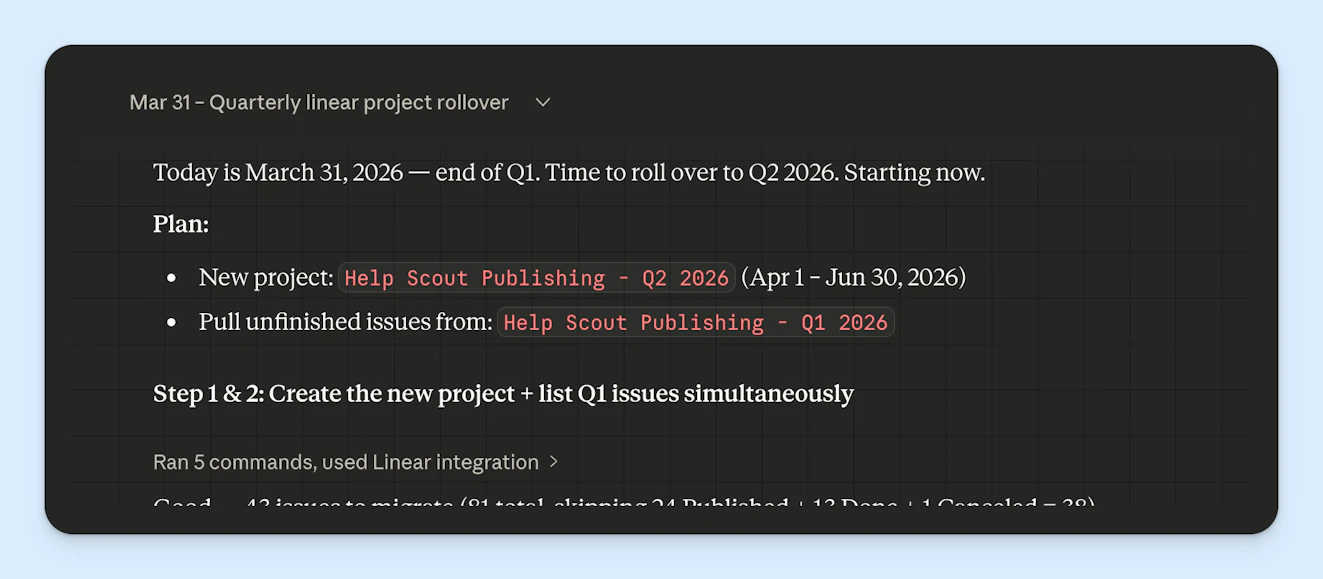
I’d say the best way to incorporate AI into your work is by identifying everything on your to-do list that is what David Sparks likes to call “donkey work.”
You know, the kind of work that needs to get done, but doesn’t really need to get done by you. Some ideas:
Weekly reports: Status updates usually just consist of data being pulled from several places and summarized for easier consumption. This is prime work for AI. Our CRO, Andrea, uses Claude to help pull together her weekly revenue channel update, and I know others do the same.
Project updates: Claude Cowork can connect with many apps in our tech stack via MCPs. While it’s a good idea to keep your amount of integrations small and intentional, connecting our project management software, Linear, to Claude has helped reduce the amount of time the team spends creating and updating issues. It’s truly a game changer.
Obviously, the list of potential donkey work is endless, so if you want to start automating, it will take time to figure out what AI uses and tools are going to be the most impactful for you and your team.
There’s no way out but through
I hope the above AI uses spark some ideas for you, but I want to caution you from thinking that trying one will let you sidestep the current change we’re all going through. One, because it won’t. And two, because I think the journey is worth it.
Each phase has merit and there’s a lot of learning that’s going on in each. Although no one uses those early projects I made, I picked up skills like prompt writing, development best practices, and tricks to prevent doom loops when vibe coding.
I’ve also become even more resolved in the idea that AI is not a replacement for human ingenuity. Vibe coding doesn’t make you an engineer, nor does prompting your way to the perfect blog post make you a thought leader.
Moving fast and breaking things can breed innovation, but relying too heavily on AI can also breed lackluster, uninspiring work just as easily. It’s important to think carefully about where the tech helps your work, where it hinders it, and where it’s a better move to team up with human coworkers.
In any case, I think there will be a lot of bopping back and forth through all of these phases — and maybe others I haven’t defined — before we find out where things will land. We’re all figuring it out together as we go, and strangely enough, I don’t think there’s anything more human than that.
Like what you see? Share with a friend.
Alexa Ahrens
Alexa is a content strategist at Help Scout, where she writes and helps other authors tell stories about customer experience, technology, and company culture. Before working in support and content creation, she worked at a wax museum — an experience that prepared her surprisingly well for a life of storytelling. Connect with her on LinkedIn.
Ready to go?

